Galley: an agent-assisted LaTeX viewer and editor
After last week’s post, I’ve gotten several questions about how I actually work with agents on a day-to-day basis. Here’s a related question that came up: is working with agents like managing a large research group, where the PI might set research directions at a high level, and is then responsible for absorbing a large volume of material produced by their very enthusiastic non-human junior collaborators? Working in that mode is certainly possible, and I’ve experimented with it a bit, so far not very seriously. But this is just one option among many, and it wouldn’t be a good description of my work over the past couple of months.
The space of possible ways to work with agents is large and high-dimensional, and it’s worth exploring. Indeed, I’ve been finding it fun to explore this space. As we are all getting up to speed in this new world we need to experiment and find what works for us, and also find ways to share what we learn with others, just as we share research results. I expect that some of my posts here will be in this spirit.
Rather than trying to convey in writing what I’m doing when I’m working, I think it will be more helpful to share a tool I recently built — with Claude — to read and edit LaTeX documents with assistance from agents. It’s called galley, and you can download it from GitHub and run it on your Mac or Linux system. I’m making this publicly available not only because I think some people will find it useful — a few of us here in Boulder are using it — but also because it illustrates some of how I am working with agents. Maybe more important, it’s the result of imagining how I want to read, write and learn new things, taking advantage of AI in a way that feels natural to me, and then talking to Claude about making that a reality.
You launch galley on a LaTeX document from a terminal window. It runs as a local web server on your computer and automatically opens up a browser window that you use to interact with the document, rendered using MathJax. I had Claude generate a couple of screenshots showing how galley is used, with our most recent paper as an example. These are mock-ups, with fake questions and requests for edits written by Claude — the paper is already on the arXiv and I developed galley only after it was finished. But they give you an idea of how it can be used in practice.
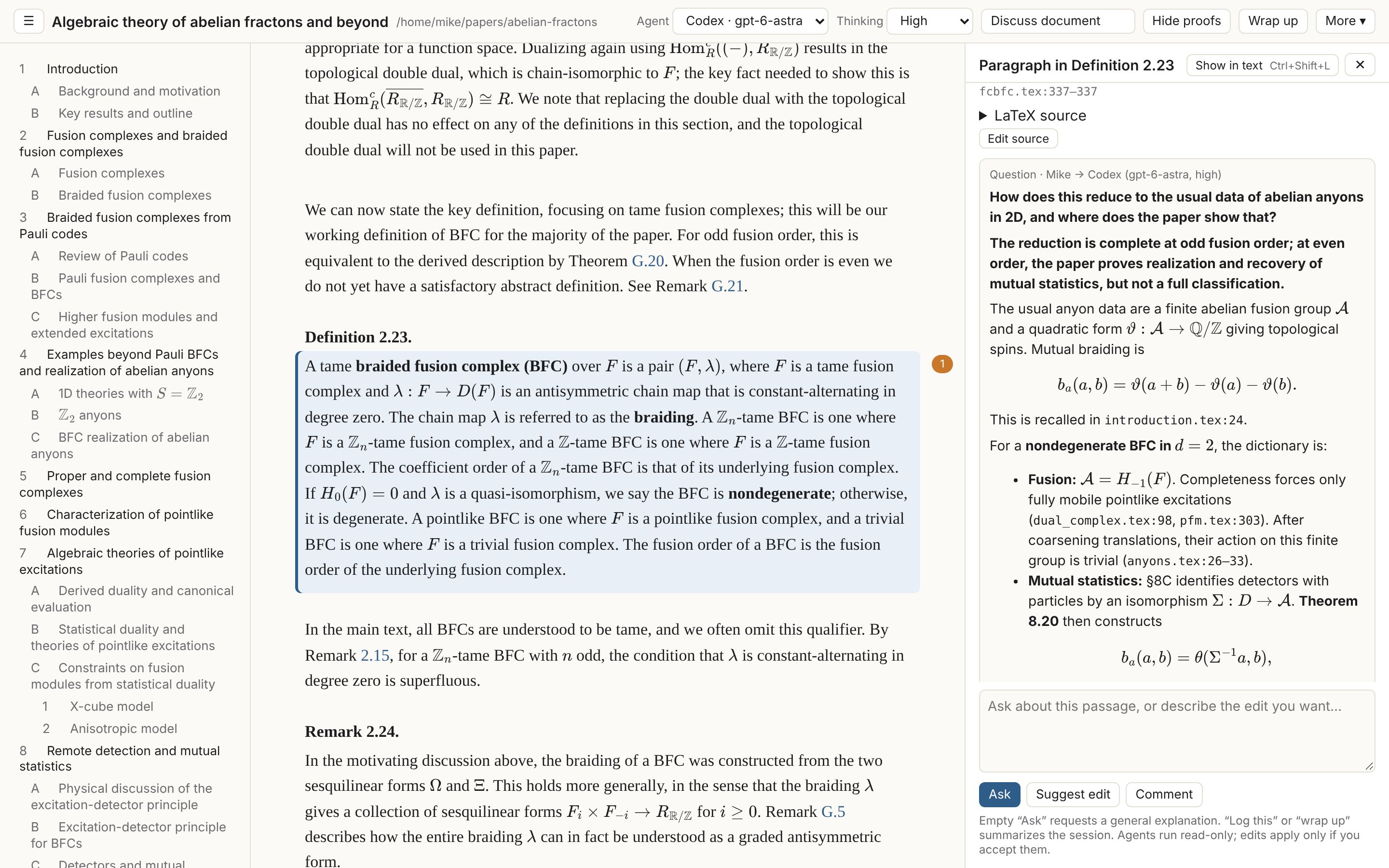
Here you can see that if you click on a paragraph, a sidebar opens up where you can have a conversation with Codex or Claude about the text at that location, informed by the entire document. Galley keeps records and summaries of your discussions in a folder next to the main document, to create persistent context for agents and to help keep track of interesting ideas or important decisions that might come up. Your past conversations remain in the viewer when you come back to a document later (notice the “1” in the orange oval, to the right of the highlighted paragraph). The “wrap up” button at the top generates a summary of the work that’s happened so far. There is also a button at the top to discuss the document as a whole.
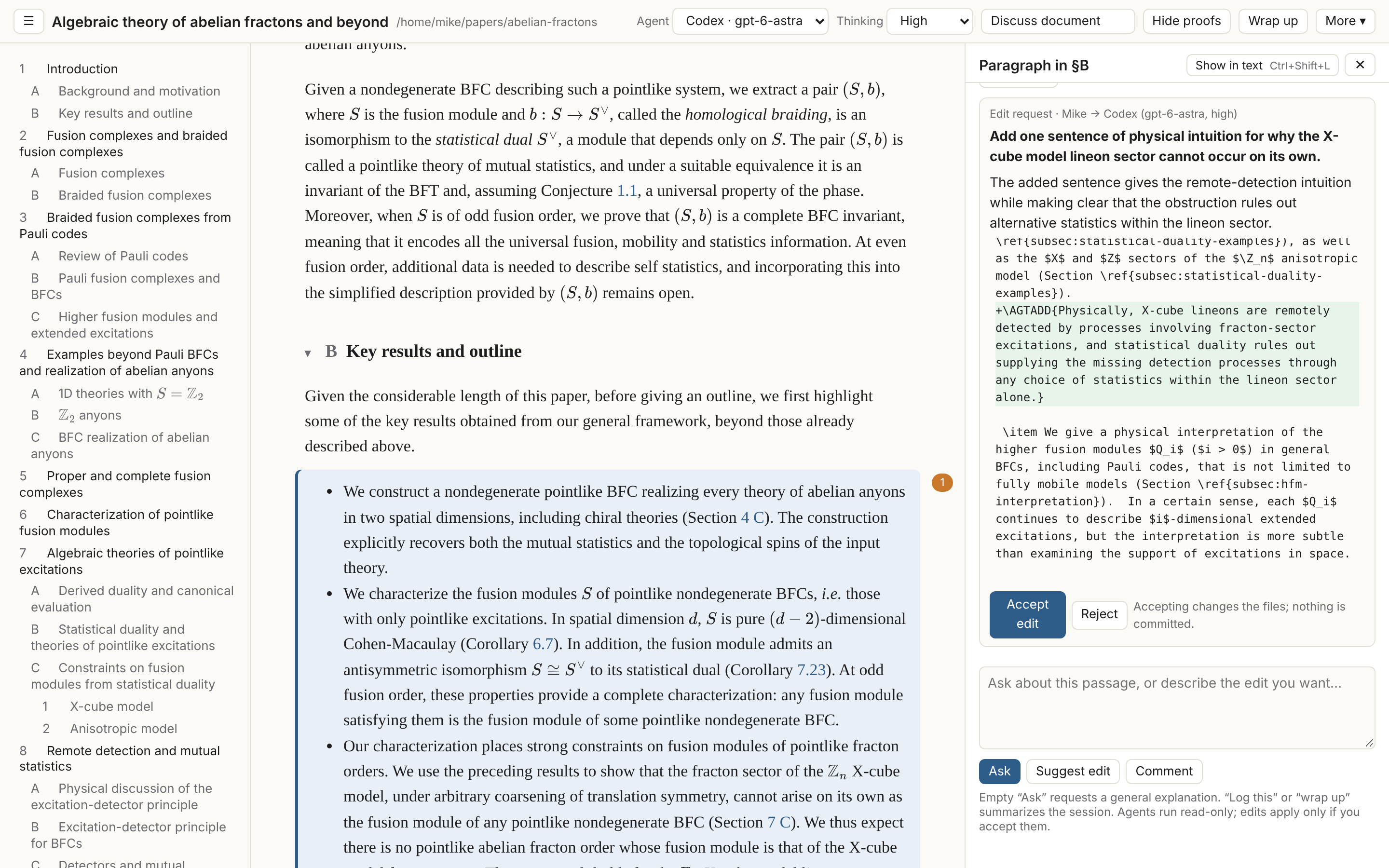
You can also have agents propose edits to the text by clicking the “suggest edit” button, and then accept or reject their edit. (By the way, I don’t like Codex’s edit here and I would have rejected it!) The agents do not touch your LaTeX files themselves; actual edits are handled by the galley app. There is a feature (not shown here) to mark all agent-written text in violet coloring, to make it easier to keep track of what has been generated by agents and not yet checked or edited by humans. You can also edit the LaTeX source directly from galley, and the rendered document updates immediately (in my experience, significantly faster than recompiling a PDF yourself). It also works well to have a text editor open alongside the viewer — when you save the file in the text editor, the viewer automatically refreshes.
If this looks interesting, download it and play around with it! You can read the info on GitHub and follow the instructions to install it, but it is a lot easier to either have your agents tell you how to install it, or just have them handle the installation. As a general disclaimer, you should obviously be careful with random software downloaded from GitHub, and I am certainly not a software developer! I did have Claude analyze and patch security vulnerabilities it found, but I don’t have the expertise to guarantee there aren’t further possible security issues.
This is home-built software, so it won’t necessarily render every LaTeX document perfectly, and some aspects are still a bit clunky. galley could certainly be modified to optimize it for all kinds of related tasks. If you find the overall concept useful, I encourage you to use agents to start from what is available on GitHub and develop your own custom version(s)! The open-source license I chose (GNU AGPL) allows for such modifications.
Disclosure on use of AI tools: I used Claude to edit this post for typos, and to assess whether any changes were needed before posting. Claude also created the galley screenshots and wrote the short description that appears in the blog listing.